
If you have been wondering is it possible to start a selling business on Amazon without any upfront costs, the answer is yes!
You don’t need to have any budget at first, and later when you obtain a few of your sales, you can invest money in growing your business.
In this article, you will find all of the information needed to start your Amazon business today without any expenses!
With four easy steps, you will be all set up and ready to run a successful business on the biggest selling platform worldwide.
Four easy steps to start your business on Amazon for free
- Find free items that you can sell on Amazon – Use your home inventory that’s just sitting there and collecting dust, and raise your starting capital.
- Create an Individual Seller Account – Individual Seller Account won’t charge you with any fee for subscription, and the flat rate of $0.99 per sold product will be deducted after you obtain the sale. That means you can sell for free because this selling plan won’t have any upfront costs.
- List your products and start selling
- Ship your products to your buyers – Choose between the FBA (Fulfillment by Amazon) or FBM (Fulfillment by Merchant) selling model.
What Amazon fees you will have to pay?
All Amazon sellers need to pay two types of fees, regardless of what selling model they choose:
- Referral fees
- Flat rate for Individual Selling account
The referral fee is practically Amazon’s commission for letting you trade on their platform. Every product has a different commission, but most of them are around 15% of the product’s sales cost.
You can find some insight at Amazing.com (Amazing Selling Maching) Review.
Individual Sellers don’t have to pay for the subscription fee, but they have to pay a $0.99 for every product sold on Amazon.
How do you know if your product will sell well on Amazon?
Before you list your items for sale, you need to determine whether that particular product will be successful on this platform and whether it will obtain any purchases.
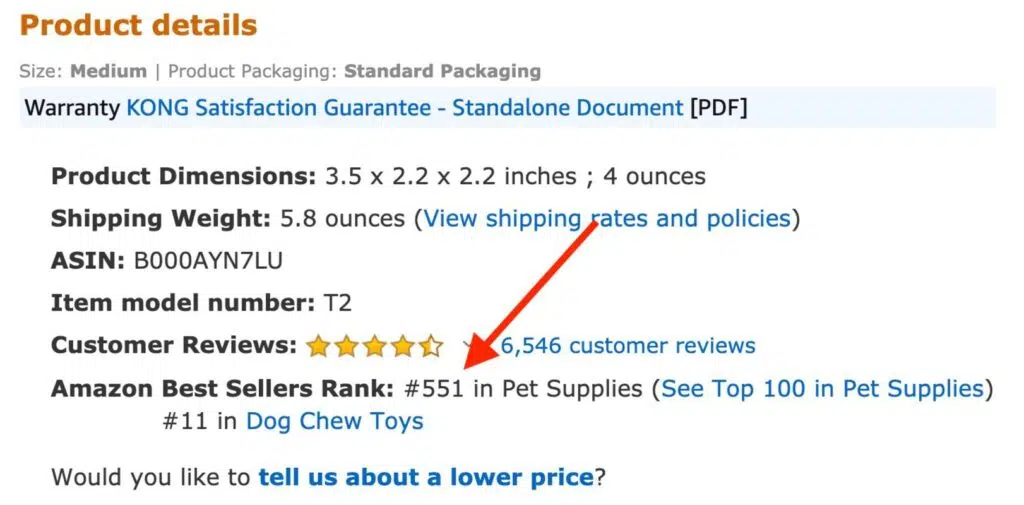
To do this, you need to: Track your products BSR – Amazon grants nearly every single product in its extensive product database with a unique score called the Best Sellers Rank or BSR.
Goods have a BSR for every category they are listed in, and the same product will have different BSRs within a specific category.
Products with lower BSR will sell better than the ones with the lower BSR.
Merchandise with a BSR of #3 will trade thousands of pieces per month versus an item with a BSR of #350,000, which will sell just a few pieces within the same time period.
Before you source and list your items, be sure to examine the product’s Best Sellers Rank. It’s located on the product listing page in the Description segment.

- Estimate the number of your sales – You can do this with IO Scout Amazon Sales Estimator. This free feature from IO Scout will calculate the average sales volume of the product per month.
- Determine how fast your item will sell – Once you determine your item’s BSR and the average sales volume per month, divide the average number of monthly sales by 30. The result is the number of sales per day for that particular product on Amazon.
List your products for free in three easy steps
If you’re selling a product that exists in Amazon’s broad catalog, you need to list your product under it. If you are selling unique items or new brand products, you will need to create a new product page.
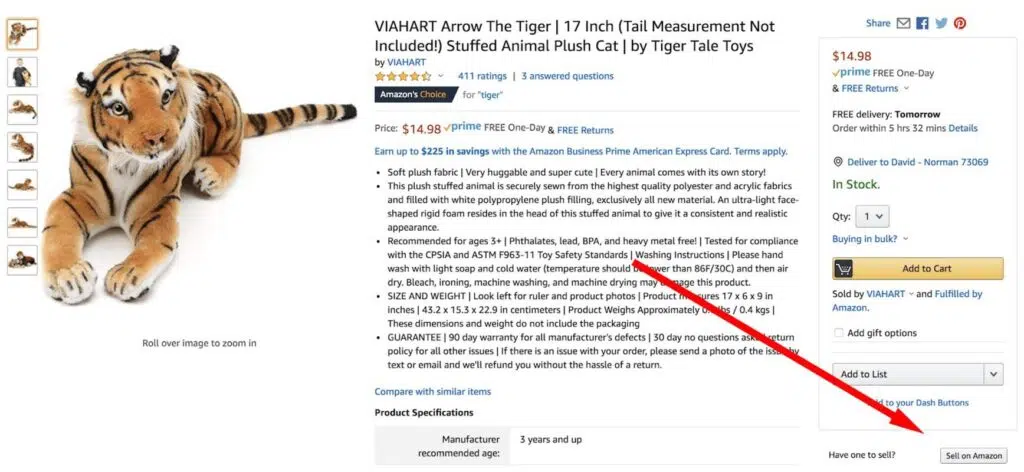
- Locate the product’s page on Amazon – In Amazon’s search bar type the relevant information to locate your desired product. You can type product title, description or identification numbers such as the UPC, and the ISBN. After Amazon generates search results, you will have to do a little bit of scrolling to find your specific product.
- Hit the “Sell on Amazon” button – After you have found your desired item, click on the “Sell on Amazon” button, located right below the Buy box.

3. Fill in your item’s information – Amazon will request from you to fill in the following information about your item:
- Condition – If you are marketing a new product, the condition should be listed as New. Oppositely, use Amazon’s condition guidelines to define the quality of the used goods you are selling.
- Price – Unless your merchandise is in a more satisfying condition than the others listed, you need to give the lowest price available. Normally, Amazon provides you a price suggestion that would make your price the lowest.
- Quantity – How many units of the item do you have for sale? If you have only a single one, you can leave this section blank. Contrarily, write the total number of your units.
- Fulfillment method – You need to determine how your orders will be fulfilled and delivered to your buyers. Will you use the FBA (fulfillment by Amazon) or the FBM (Fulfillment by Merchant) model? If you choose the FBA method, make sure to get an in-depth understanding of all fees and costs related to Amazon FBA. IO Scout is a software solution for Amazon sellers that offers, among all other features, the IO Scout Amazon FBA Calculator. You can use this feature for free on IO Scout’s official website to calculate all fees related to this selling method.
After you have filled all of the information requested, click “Save and Finish.” Your item will appear on the product’s listing page within two hours.